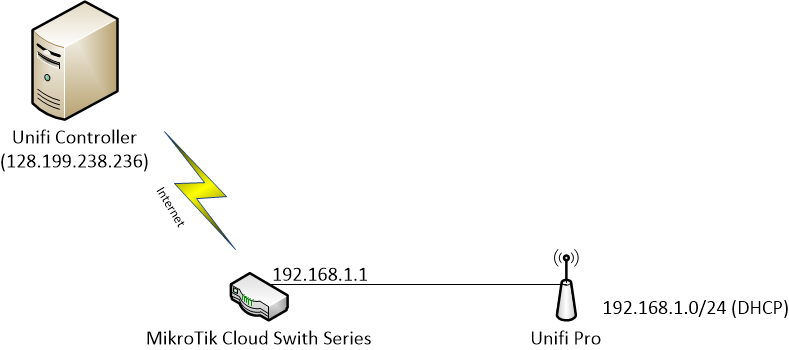
We installed Unifi Pro AP in our client’s office to provide wireless access to employees. The network diagram as follow (I’ve changed the configuration to fake IP address because of our client privacy and another security reason). The Unifi Controller in this configuration have public IP address that can accessed anywhere in the world that have internet connection.

To make Unifi Pro access point can adopted by Unifi Controller, I make DHCP in MikroTik Cloud Switch series, with add DHCP option code 43 using MikroTIk Terminal. Unifi introduced the usage of DHCP Option 43 which is used to provide clients and devices on a network the ability to locate the Unifi Controller.
Option 43 value in MikroTik DHCP will be "0x0104" + the HEX of the IP, for example in this network 128.199.238.236 converted to 80C7EEEC. Just search “Convert IP to Hexadecimal IP” and you will find so may converter tools in the Internet. After DHCP in MikroTik is set and computer that use DHCP can access the Unifi Controller port 8080 (in this example is “http://128.199.238.236:8080/inform”), type command in MikroTik Terminal to add DHCP option 43:
/ip dhcp-server option add code=43 name=unifi value=0x0104080C7EEEC
/ip dhcp-server network set 0 dhcp-option=unifi
After turn on the system, Unifi Pro AP will be shown in the Unifi Controller automatically. Unfortunately my configuration was not working. I tried more than half day just to figured out what happen. Then I just reset the Unifi Pro AP by push reset button and then it works. The problem was (maybe) Unifi AP adopted (tested by supplier) before it arrived to my client’s office. New version of Unifi Controller will not detect AP that has adopted by another Controller.