Showing posts with label Web Development. Show all posts

Thursday, September 18, 2014

How to Get Website With One Million Page Views Per Month

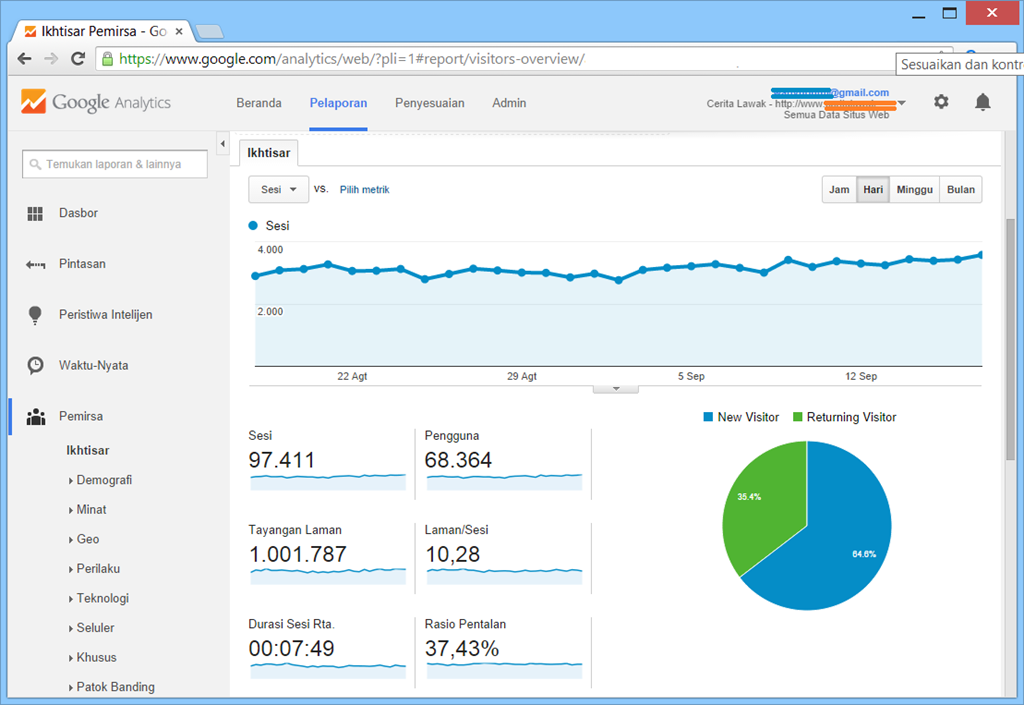
Today I open my Google Analytics account and got one of my web portal reach 1 million page views in last 30 days. I don’t publish the website address because this website is just experimental website created by me less than 1 year ago. Here is the screenshot of Google Analytics account, and I think it’s amazing.

analytics_1_million_pageviews

I didn’t do any off site SEO or something, but I just tried to:

  1. Manage daily regular posting.
  2. Promotion: AdWords with budget no more than 30 clicks per day.

The traffic increased steadily and now reach my target of 1 million page views. So, I have conclusion that regular update is one of the factors that can affect traffic of the website because of returning visitors.

Saturday, August 23, 2014

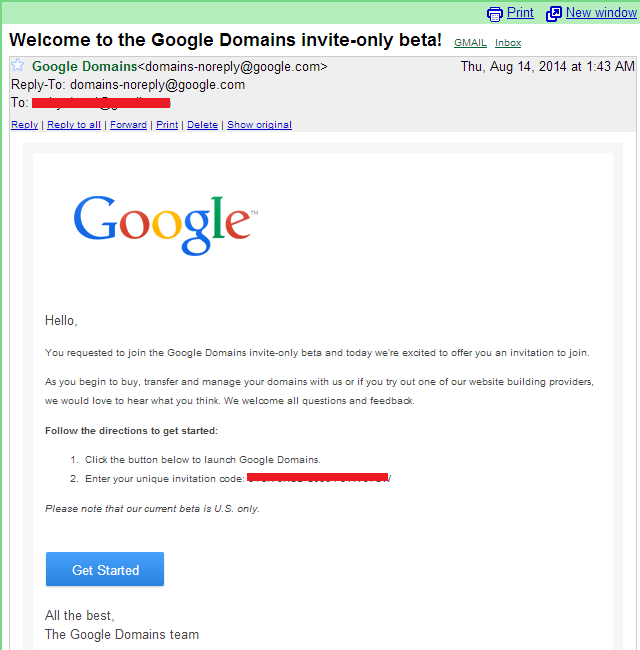
Welcome to the Google Domains invite-only beta!

This post title just subject of incoming email arrived in my Inbox. I just got email from Google about my request to join Google Domains. They give me invitation code, so I can activate my Google Domains account. Unfortunately, Google give note that their current beta is U.S. only.

google_domain

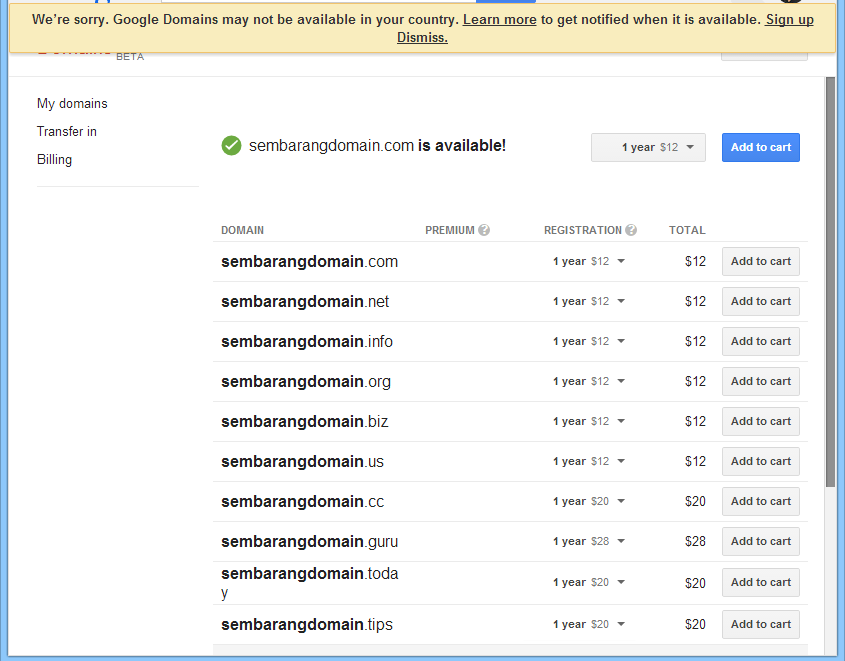
I tried the feature of Google Domains. It seems that the pricing for domains at Google is very standard. It’s cost US$ 12 for .com, .net and .org and some domain are US $ 20 and US $ 28. I can’t go further because I got notification from Google about my status.

“We’re sorry. Google Domains may not be available in your country. Learn more to get notified when it is available.”

They recognize my origin from payment data in Google Wallet.

google_domain_2

With that amount of registration pricing, I think Google will beat the competition in domain market. They put the price on average - not too cheap, but also not too high. And it is likely that they will give value-added service with their domain registration service. Google already have domain registration service with Google Apps since few years ago with domain registration pricing is US $10 and integrated their Google Apps domain registration with free email, calendar, online office suite and other.

Saturday, December 7, 2013

Minimum Number of Pages Required for Google Adsense

How many pages required by Google for Adsense? I'm not Adsense expert but sometimes my friends who learn to create a web page ask me about Adsense to earn money for ads placement in their websites.

Google don't give the minimum amount of pages required to join Adsense, but it is important that Google need pages with high quality content. The website must contains plenty of rich information that includes relevant keywords, used appropriately, that indicate the subject matter of the content.

The website that may will be banned from Google Adsense include:

Autogenerated content
Automatically generated content is content that’s been generated by computer program or script. Often this will consist of paragraphs of random text that makes no sense to the reader but which may contain search keywords.

Doorway pages
Doorway pages are typically large sets of poor-quality pages where each page is optimized for a specific keyword or phrase. In many cases, doorway pages are written to rank for a particular phrase and then funnel users to a single destination.

  • Having multiple domain names targeted at specific regions or cities that funnel users to one page
  • Templated pages made solely for affiliate linking
  • Multiple pages on your site with similar content designed to rank for specific queries like city or state names

Scraped content and thin affiliate sites
Scaped content is content taken from other sites to increase the volume of pages on a website. Example of thin affiliate sites:

  • Sites that copy and republish content from other sites without adding any original content or value
  • Sites that copy content from other sites, modify it slightly (e.g.: by substituting synonyms or using automated system), and republish it
  • Sites that reproduce content feeds from other sites without providing some type of unique organization or benefit to the user
  • Sites dedicated to embedding content such as video, images, or other media from other sites without substantial added value to the user

It is important for a site displaying AdSense to offer significant value to the user by providing unique and relevant content, and not to place ads on auto-generated pages or pages with little to no original content.  Your site should also provide a good user experience through clear navigation and organization. Users should be able to easily click through your pages and find the information they are seeking.

So, it's not a question of the number of pages, it's the content that is contained within them. If you still ask me about how many pages required for Google Adsense, maybe in my humble opinion, I can say that 6 month worth of daily posts with original content is good for the start.

Source:
http://www.google.com/support/webmasters/bin/answer.py?answer=66361

How to Add a XML Sitemap to Blogger (Blogspot) Blog

A site map is a list of pages of a web site accessible to users or crawlers. An XML Sitemap is a structured format to tells the search engine about the pages in your site, their relative importance to each other, and how often they are updated. The default XML sitemap file hosted on Blogger will have only the 26 most recent blog posts. There’s however a simple solution to fix the problem.

You don’t need to use sitemap generator. Just use this as your Blogger sitemap.

http://BLOGNAME.blogspot.com/atom.xml?redirect=false&start-index=1&max-results=50000

Change BLOGNAME with your Blogspot subdomain name. Or, if you use your own domain on Blogger, just change whole domain “BLOGNAME.blogspot.com” with yours. I assume that maximum sitemap size in your Blogger is 50,000 posts, since maximum pages allowed in 1 sitemap file in Google is 50,000 pages, but you can change the limit with your own. But, if you are single poster with original content, it will be very hard to reach that amount of posts.

Friday, December 6, 2013

What Are the Limitations of a Blogger Account

I just convert my old blog from self-hosted Wordress to Blogger because it easier to maintenance and also free and I can use my own domain. After use Blogger for a while, I were wondering about about what a single Blogger / Blogspot account will hold. From their website, I got the following information.

Number of Blogs
Users can have multiple blogs in their account, but the limit is the user can have maximum up to 100 blogs per account.

Number of Posts
Blogger don't give limit on the number of posts on one blog. So you can write everything without fear that you will reach maximum posts. Anyway, blog posting that considered spam usually can make your website banned.

Size of Posts
Individual posts do not have a specific size limit, but very large posts may run you up against the page size limit. (See the next item.)

Size of Pages
Individual pages (the main page of your blog, or your archive pages) are limited to 1 MB in size. This will allow for a few hundred pages of text, but it may be a problem if you are listing hundreds of posts on the front page of your blog. If you hit this limit, you will see an error message saying "006 Please contact Blogger Support." You can get around this error by lowering the number of posts on your main page, which will have the added benefit of making your page load faster as well.

Number of Comments
A post can have any number of comments. As with archived posts, if you choose to hide comments on your blog, all pre-existing comments will remain saved on your account.

Number of Pictures
Up to 1 GB of total storage, shared with Picasa Web. You can get more space by buy addedd storage from Google.

Size of Pictures
I got no problem when tried to post with big images that more than 1 MB. But they said if you are posting pictures through Blogger Mobile there is a limit of 250K per picture.

Team Members
There is a limit of 100 members per blog.

Number of Labels
Up to 2000 unique labels per blog and 20 per post.

I just convert my old blog from self-hosted Wordress to Blogger because it easier to maintenance and also free and I can use my own domain. After use Blogger for a while, I were wondering about about what a single Blogger/Blogspot account will hold. From their website, I got the following information.

Number of Blogs
Users can have multiple blogs in their account, but the limit is the user can have maximum up to 100 blogs per account.

Number of Posts
Blogger don't give limit on the number of posts on one blog. So you can write everything without fear that you will reach maximum posts. Anyway, blog posting that considered spam usually can make your website banned.

Size of Posts
Individual posts do not have a specific size limit, but very large posts may run you up against the page size limit. (See the next item.)

Size of Pages
Individual pages (the main page of your blog, or your archive pages) are limited to 1 MB in size. This will allow for a few hundred pages of text, but it may be a problem if you are listing hundreds of posts on the front page of your blog. If you hit this limit, you will see an error message saying "006 Please contact Blogger Support." You can get around this error by lowering the number of posts on your main page, which will have the added benefit of making your page load faster as well.

Number of Comments
A post can have any number of comments. As with archived posts, if you choose to hide comments on your blog, all pre-existing comments will remain saved on your account.

Number of Pictures
Up to 1 GB of total storage, shared with Picasa Web. You can get more space by buy additional storage from Google.

Size of Pictures
I got no problem when tried to post with big images that more than 1 MB. But they said if you are posting pictures through Blogger Mobile there is a limit of 250K per picture.

Team Members
There is a limit of 100 members per blog.

Number of Labels
Up to 2000 unique labels per blog and 20 per post.

Blog Description
Limited to 500 characters, with no HTML. Adding additional characters or HTML may cause it to revert to a previous setting.

"About Me" Profile Information
Maximum of 1,200 characters.

Profile Interests and Favorites
Maximum of 2,000 characters in each field.

The conclusion, I don't too worry with the limitation, because from the history of my posts, since year 2005 I never reach more than 1000 blog posts.

Source:
https://support.google.com/blogger/answer/42348?hl=en